 By DSP Staff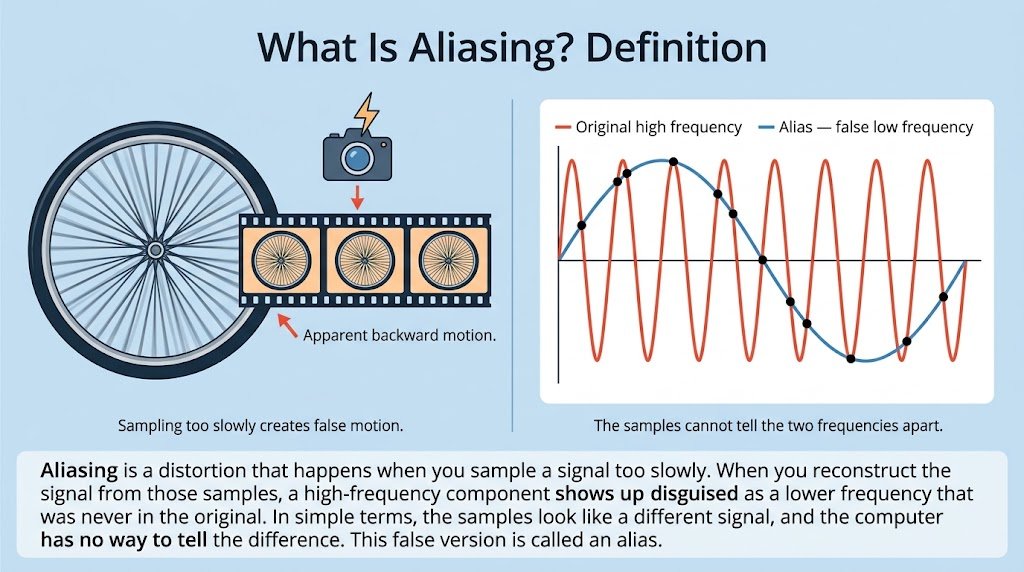
Table of Contents
- What Is Aliasing? Introduction to the Definition
- Why Does Aliasing Matter? Key Benefits of Understanding It
- Aliasing Key Facts, Types, and How It Works
- How to Prevent Aliasing Step by Step
- Common Aliasing Mistakes and Myths to Avoid
- Expert Tips for Avoiding Aliasing
- Frequently Asked Questions About Aliasing
Have you ever watched a car wheel on TV appear to spin backward, even though the car moves forward? That illusion is aliasing, and it is one of the most important ideas in digital signal processing. Every time a computer records sound, video, or medical data, it takes snapshots at fixed intervals, and those snapshots can lie. If you are a student, you will meet aliasing in sampling theory, audio engineering, and image processing. In this guide, you will learn the definition of aliasing, why it happens, the Nyquist frequency rule that prevents it, and how to fix it. You will also see the myths that confuse beginners.
What Is Aliasing? Introduction to the Definition
Aliasing is a distortion that happens when you sample a signal too slowly. When you reconstruct the signal from those samples, a high-frequency component shows up disguised as a lower frequency that was never in the original. In simple terms, the samples look like a different signal, and the computer has no way to tell the difference.
Think of a friend who takes a photo of you every second while you spin a bicycle wheel very fast. Each photo catches the spokes in nearly the same position, so the wheel looks like it is barely turning or even turning backward. Your camera is sampling too slowly for the motion it is capturing, and the result is a false motion.
The sampling frequency (fs) is how many samples you take per second. Any component above half of that value, called the Nyquist frequency (fs/2), will appear as a fake lower frequency. This false version is called an alias.
Why Does Aliasing Matter? Key Benefits of Understanding It
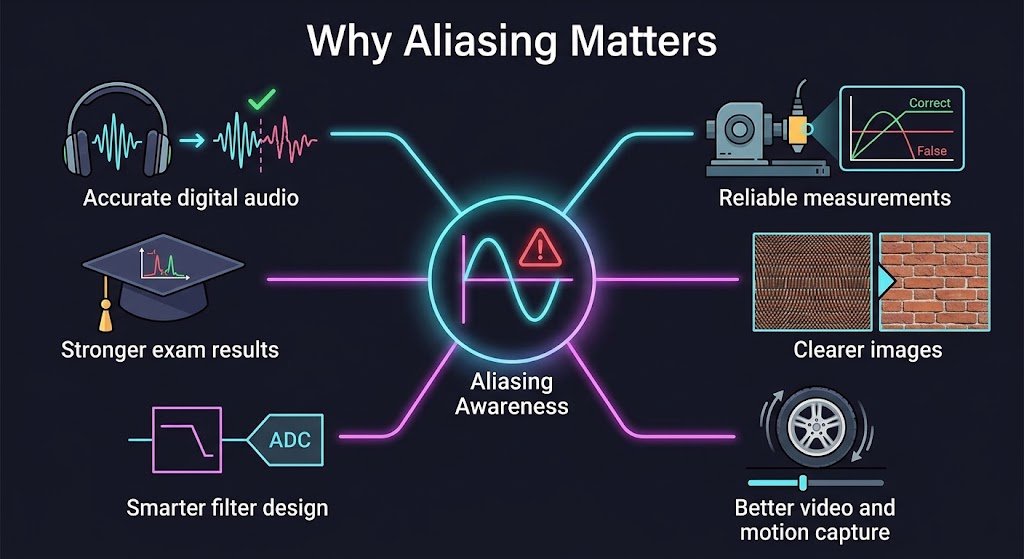
Learning about aliasing helps you design better systems and avoid confusing results. Here are the main reasons it matters:
- Accurate digital audio: Knowing the Nyquist limit keeps music and speech from sounding harsh or distorted after recording.
- Reliable measurements: Sensors and instruments give correct readings only when you sample above the required rate.
- Clearer images: Understanding spatial aliasing explains why moiré patterns appear on photos of brick walls or fabric.
- Better video and motion capture: Knowing temporal aliasing helps you choose frame rates that avoid the wagon-wheel effect.
- Smarter filter design: You learn when to add an anti-aliasing filter before sampling.
- Stronger exam and project results: Aliasing questions appear often in sampling and spectrum topics.
A widely cited data point comes from the history of audio engineering. According to the Wikipedia article on aliasing, music sampled at 32,000 samples per second can only represent frequencies below 16,000 Hz without distortion. Anything higher folds back into the audible range.
Aliasing Key Facts, Types, and How It Works
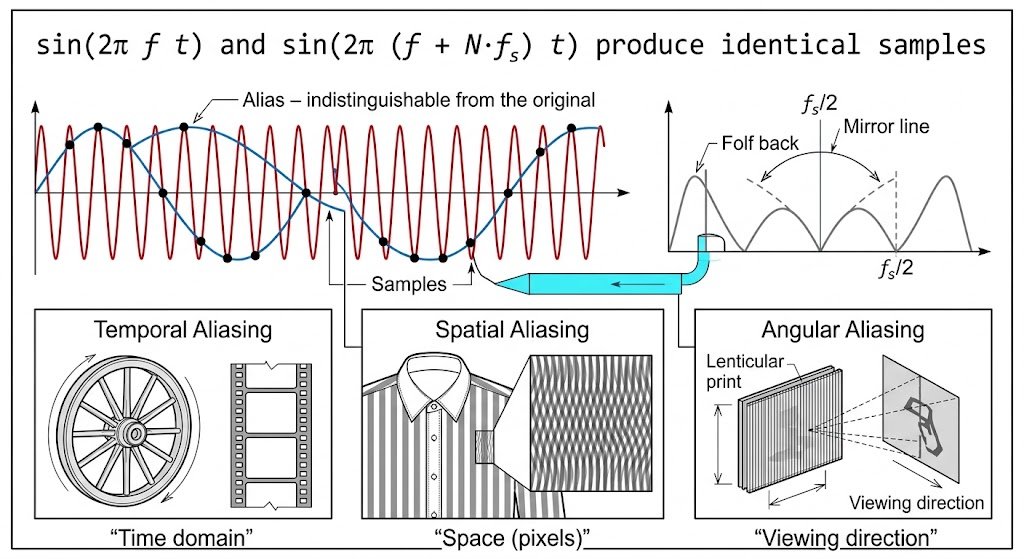
Aliasing follows a clear mathematical pattern. A sinusoid at frequency f and another at f + N·fs produce identical samples, where N is any integer. So the samples alone cannot tell you which frequency was actually present.
Temporal Aliasing
Temporal aliasing happens when you sample a signal over time, as in digital audio or video. The wagon-wheel effect is a classic example, where the frame rate of a camera is too low for the wheel’s rotation speed.
Spatial Aliasing
Spatial aliasing occurs when you sample across space, such as pixels in an image. A fine striped shirt or a brick wall can produce a moiré pattern when the image resolution is too low for the detail in the scene.
Angular Aliasing
Angular aliasing appears in systems that capture direction, such as lenticular prints or microphone arrays. Low angular resolution makes the image jump or the sound direction become ambiguous.
Comparison of Aliasing Types
| Type | Domain | Typical Example | Common Fix |
|---|---|---|---|
| Temporal | Time | Wagon-wheel effect, audio sampling | Higher sample or frame rate |
| Spatial | Space (pixels) | Moiré pattern on a fabric photo | Higher resolution, anti-aliasing |
| Angular | Viewing direction | Lenticular image jumping | More angular detail |
How to Prevent Aliasing Step by Step
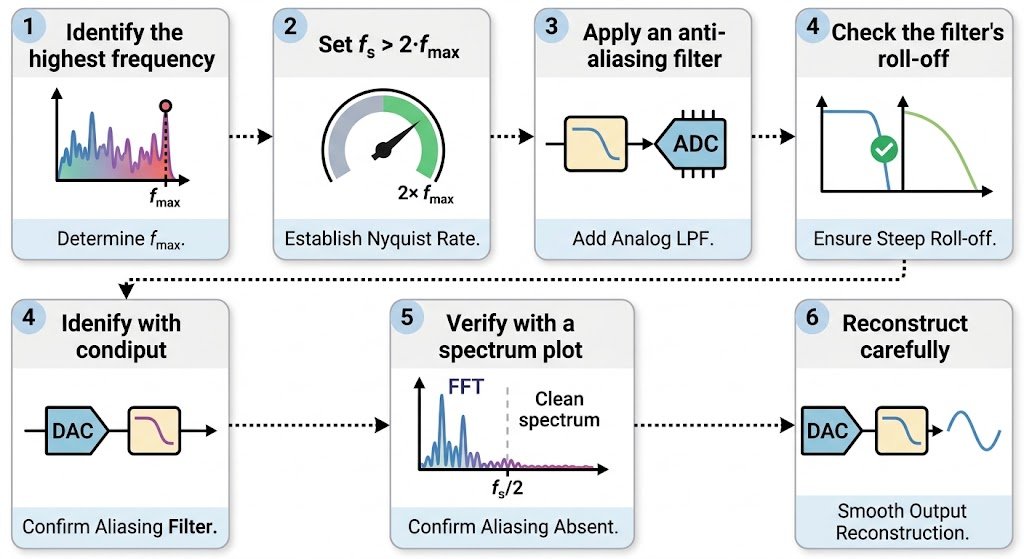
Following these steps will help you prevent aliasing in your own sampled signals.
- Identify the highest frequency in your signal. Look at the spectrum or the physical limit of your sensor. This tells you the maximum content you must capture.
- Set your sampling rate above twice that frequency. The Nyquist rule requires fs to be greater than 2 times the highest frequency. For audio at 20 kHz, use at least 40 kHz.
- Apply an anti-aliasing filter before sampling. A low-pass filter removes components above fs/2 so they cannot fold into the useful band. Set its cutoff just below the Nyquist frequency.
- Check the filter’s roll-off. A gentle slope may let some high frequencies through, so choose a steeper filter if your signal has strong content near the limit.
- Verify with a spectrum plot. Use an FFT to confirm that energy near and above fs/2 is very low. Any mirrored peaks signal aliasing.
- Reconstruct carefully when converting back. Use proper reconstruction filtering so the digital samples return to a clean analog signal.
Common Aliasing Mistakes and Myths to Avoid
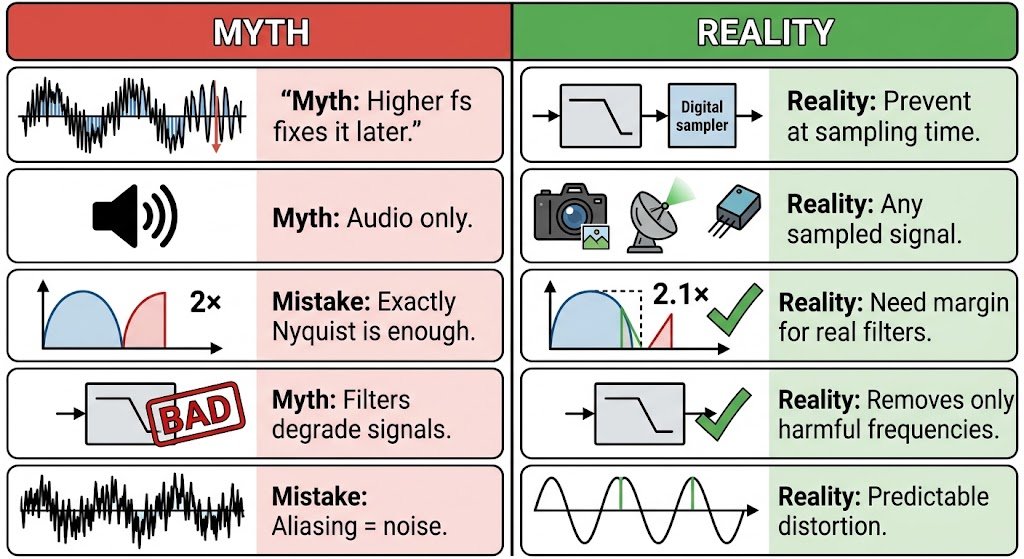
Mistake: Thinking a higher sampling rate removes aliasing after the fact. The truth is that aliasing happens during sampling. Once high frequencies have folded down, no later processing can separate the false component from real ones.
Myth: Aliasing only affects audio. The truth is that aliasing appears in images, video, radar, and any system that samples a continuous signal, including spatial and angular forms.
Mistake: Assuming a sampling rate of exactly twice the frequency is enough. The truth is that the Nyquist criterion requires a sampling rate above twice the highest frequency. Real filters need extra margin to work well.
Myth: Anti-aliasing filters make signals worse. The truth is that they remove only the frequencies that would cause false components. The useful band stays intact when you set the cutoff correctly.
Mistake: Confusing aliasing with noise. The truth is that aliasing is a deterministic distortion. The same input always produces the same false frequency, which makes it predictable and fixable.
Expert Tips for Avoiding Aliasing
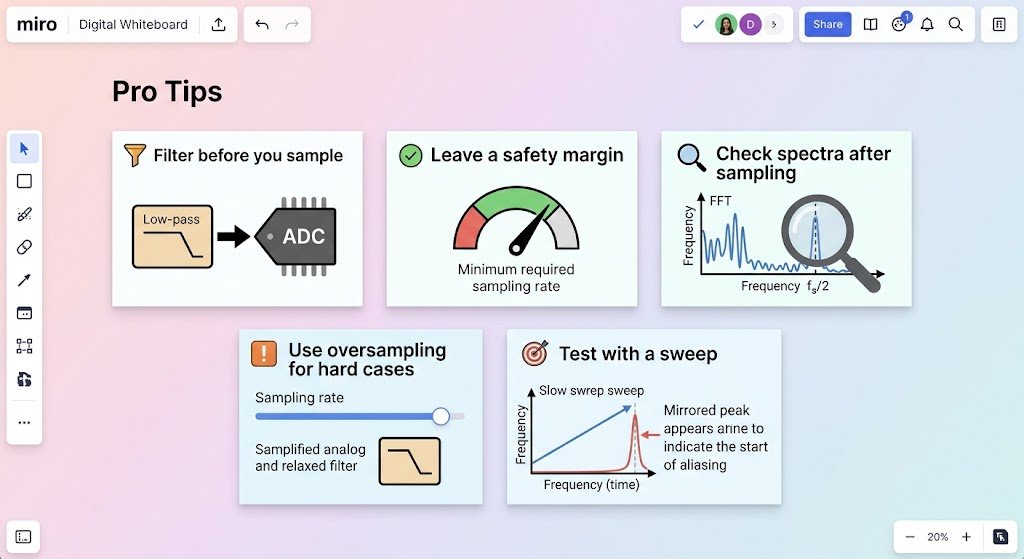
- Filter before you sample. Always place an anti-aliasing filter ahead of your analog-to-digital converter.
- Leave a safety margin. Sample a little above the Nyquist minimum so the filter has room to roll off.
- Check spectra after sampling. Look for mirrored peaks near fs/2 to catch problems early.
- Use oversampling for hard cases. Sampling higher than needed relaxes the requirements on your analog filter.
- Test with a sweep. A slow frequency sweep shows exactly where aliasing starts in your system.
Frequently Asked Questions About Aliasing
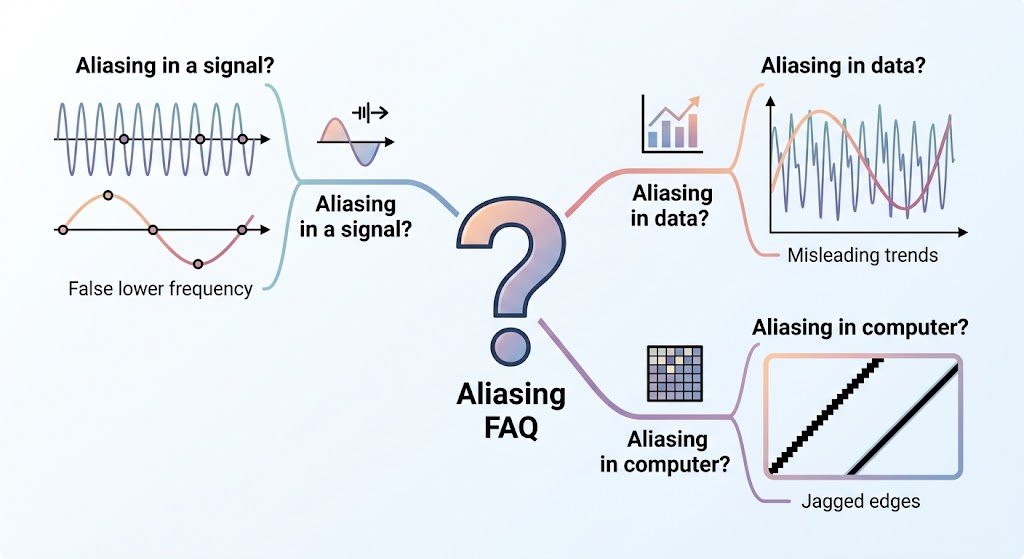
What is aliasing in a signal?
Aliasing in a signal happens when high-frequency content is sampled too slowly and appears as a false lower frequency after reconstruction. The original and false frequencies produce identical samples, so the computer cannot tell them apart. This is why a sampled audio tone above half the sampling rate can sound like a completely different pitch. To avoid it, you filter out components above the Nyquist frequency before sampling. Once aliasing has occurred, the damage cannot be undone, so prevention is the only reliable fix.
What is aliasing in data?
In data analysis, aliasing means that a sampled dataset contains patterns that look real but actually come from a faster variation in the original source. Time series from sensors, stock prices, and lab measurements can all show this effect. If you record a vibration every second but the machine spins 1.5 times per second, the data may show a slower false cycle. Checking your sampling rate against the fastest process you expect helps you spot and prevent misleading trends.
What is aliasing in computer?
In computing, aliasing describes jagged or stair-stepped edges that appear when a continuous shape is drawn on a discrete pixel grid. Lines look rough because each pixel can only be fully on or off. Computers reduce this by using anti-aliasing methods such as supersampling or MSAA, which blend edge pixels to smooth the transition. The same underlying principle connects these visual edges to digital audio and sampling theory.
You now have the essentials: aliasing is a false lower frequency created when you sample too slowly, the Nyquist rule says your sampling rate must exceed twice the highest frequency, and an anti-aliasing filter prevents the problem before it starts. Remember these three points: sample above fs/2, filter before sampling, and check your spectrum afterward. Start today by recording a fast-spinning object or a simple tone, then compare the result with a higher sampling rate. Which signal would you like to analyze first, audio, video, or sensor data? Share your project in the comments below!