 By DSP Staff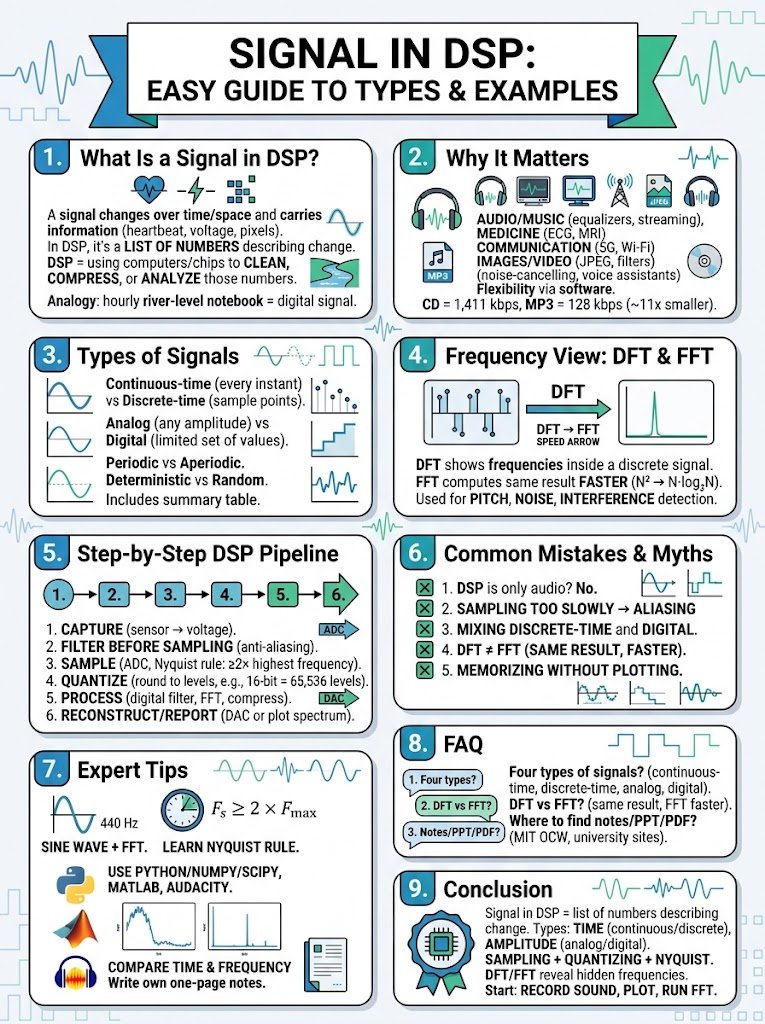
Introduction
Right now, your phone is turning your voice into a stream of numbers, thousands of them every second. Each number is a tiny snapshot of a sound wave, and together they form a signal in DSP. Once a computer holds those numbers, it can clean noise, boost bass, or recognize your words.
If you are new to the field, the term can feel vague. What counts as a signal? How is a digital signal different from an analog one? And where do the DFT and FFT fit in?
This guide answers those questions in plain language. You will learn:
- what a signal is and what DSP means
- the types of signals and how to tell them apart
- real signal in DSP examples from audio, images, and medicine
- a step-by-step path from raw signal to useful result
- common mistakes, study tips, and short answers to the questions students search most
No heavy math is required. Whether you are studying for an exam or just curious, you will leave with a clear mental map.
Table of Contents
- What Is a Signal in DSP?
- Why Does a Signal in DSP Matter?
- Types of Signal in DSP: Key Facts and How They Work
- How to Work With a Signal in DSP: Step by Step
- Common Digital Signal Processing Mistakes and Myths
- Expert Tips for Learning Signal Processing
- Frequently Asked Questions
- Conclusion
What Is a Signal in DSP?
A signal is anything that changes over time (or space) and carries information. Your heartbeat, the temperature in your room, the voltage from a microphone, and the brightness along a row of pixels are all signals. In short, a signal in DSP is a list of numbers that describes how something changes.
Digital signal processing (DSP) means using a computer or a special chip to work on those numbers. Signal processing is the act of changing or studying a signal so you can clean it, compress it, or pull out useful facts. That could mean removing hiss from a recording or spotting an irregular heartbeat.
Here is an analogy. Imagine tracking a river’s water level by writing down one measurement every hour. The river flows continuously, but your notebook holds only a list of numbers.
That notebook is a digital signal. Any math you do on the list, like averaging it or spotting a flood trend, is DSP. The big advantage is that numbers are easy to copy, store, and change without adding new noise.
Why Does a Signal in DSP Matter?
Almost every modern device turns real-world signals into numbers first. Here is where that pays off:
- Audio and music: Equalizers, synthesizers, and streaming apps all process sound as numbers.
- Medicine: ECG monitors and MRI scanners clean and analyze body signals to help doctors see what is happening.
- Communication: Phones, Wi-Fi, and 5G send and receive information by shaping signals.
- Images and video: JPEG compression and camera filters treat each image as a signal.
- Smart devices: Noise-cancelling headphones and voice assistants detect and remove unwanted sound in real time.
- Flexibility: You can fix or upgrade a digital system with a software update instead of new hardware.
The numbers show why compression matters. A standard audio CD samples sound 44,100 times per second with 16-bit values, which works out to about 1,411 kbps for stereo (Red Book CD standard). A typical MP3 uses just 128 kbps, roughly 11 times smaller, by discarding details your ears barely notice.
Types of Signal in DSP: Key Facts and How They Work
Signals can be sorted in several ways. The two most useful are by time and by amplitude.
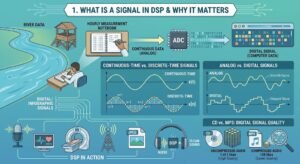
Continuous-Time vs Discrete-Time Signals
A continuous-time signal has a value at every instant. Sound waves and body temperature are good examples. A discrete-time signal has values only at specific moments, such as one reading every second.
Sampling turns the first kind into the second.
Analog vs Digital Signals
These labels describe the amplitude, meaning the height of the signal. An analog signal can take any value in a range, like the voltage from a microphone. A digital signal can take only a limited set of values, because each number is rounded to fit a fixed number of bits.
A song stored as an MP3 is a digital signal.
Other Common Ways to Sort a Signal
Signals can be periodic (they repeat, like a steady 50 Hz mains hum) or aperiodic (they don’t, like a single clap). They can also be deterministic (predictable from a formula) or random (like noise). Real signals often mix these traits.
Summary Table
| Type | Time axis | Amplitude | Example |
|---|---|---|---|
| Continuous-time | Every instant | Any value | Sound wave in air |
| Discrete-time | Only at sample points | Any value | Hourly temperature reading (before rounding) |
| Analog | Usually continuous | Any value in a range | Microphone voltage |
| Digital | Discrete | Limited set of values | MP3 or WAV file |
The Frequency View: DFT and FFT
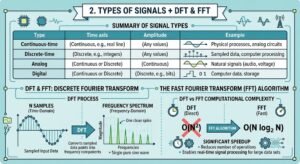
Sometimes the time view hides the story. The Discrete Fourier Transform (DFT) shows which frequencies live inside a discrete signal, and the Fast Fourier Transform (FFT) computes the same result much faster. Together they are the main tools for spotting pitch, noise, and interference.
How to Work With a Signal in DSP: Step by Step
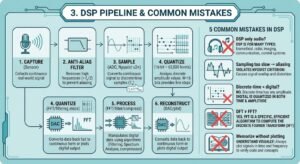
Every DSP system follows a similar path. Here is the basic pipeline, from real world to result:
- Capture the signal. A sensor such as a microphone, camera, or ECG electrode turns a real-world event into a voltage. This is your analog signal. Check that it is strong enough and free of obvious interference.
- Filter before sampling. Pass the signal through an anti-aliasing filter that removes frequencies above half your sampling rate. Skip this step, and high frequencies will fold down and pose as false low ones.
- Sample it. An analog-to-digital converter (ADC) measures the voltage at fixed intervals. Follow the Nyquist rule: sample at least twice as fast as the highest frequency you want to keep.
- Quantize it. Each measurement is rounded to the nearest level the hardware allows, such as one of 65,536 levels for 16 bits. More bits mean finer detail and less rounding noise.
- Process the numbers. Now the real work begins. Apply a digital filter to remove noise, run an FFT to view the spectrum, or compress the data. Software handles all of it.
- Reconstruct or report. For audio, a digital-to-analog converter (DAC) turns the numbers back into a voltage for your speaker. For analysis tasks, you may simply plot the spectrum or store the result.
Want to try it yourself? Record a note on your phone, load the file in Python with NumPy, and run numpy.fft.rfft to see its frequencies.
Common Digital Signal Processing Mistakes and Myths
Mistake 1: Thinking DSP is only about audio. DSP also powers medical imaging, radar, cameras, wireless networks, and sensors in cars and factories.
Mistake 2: Sampling too slowly. If you sample below twice the highest frequency, aliasing creates false frequencies that you cannot remove afterward. Always filter first and sample fast enough.
Mistake 3: Mixing up discrete-time and digital. Discrete-time describes when values exist. Digital describes how precise each value is. A signal can be discrete-time but still analog until you quantize it.
Mistake 4: Believing the DFT and FFT give different answers. They give the same result. The FFT is simply a faster method of computing the DFT.
Mistake 5: Memorizing formulas without plotting. A formula on paper feels abstract, but a plot of the same signal makes the idea click. Always look at your data.
Expert Tips for Learning Signal Processing
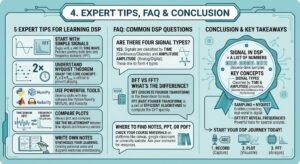
- Start with a pure sine wave. Generate a 440 Hz tone, plot it, and run an FFT, because you will see one clean spike and understand the basics fast.
- Learn the Nyquist rule by heart. It explains aliasing, sampling rates, and why CDs use 44.1 kHz.
- Use free tools. Python with NumPy and SciPy, MATLAB, and Audacity’s spectrum view let you experiment in minutes.
- Compare time and frequency plots side by side. This habit builds intuition faster than any lecture.
- Write your own one-page notes. A short summary of definitions, sampling rules, and the DFT formula beats a downloaded PDF because writing it locks the ideas in.
Frequently Asked Questions
What are the four types of signals?
The four types most textbooks list are continuous-time, discrete-time, analog, and digital signals. Continuous-time and discrete-time describe how the time axis works: every instant versus separate sample points. Analog and digital describe amplitude: any value versus a limited set of values. A microphone voltage is analog, while an MP3 file is digital. Some courses also sort signals as periodic or aperiodic, and deterministic or random.
What is DFT and FFT in DSP?
The DFT (Discrete Fourier Transform) converts a list of samples into a list of frequency values, showing how much of each frequency the signal contains. The FFT (Fast Fourier Transform) is not a different result; it is a much faster way to compute the same DFT. For N samples, it cuts the work from about N² steps to N·log₂N, which makes real-time audio and video analysis possible.
Where can I find signal in DSP notes, PPT, and PDF files?
University course sites are the best source for free signal in DSP notes, slides, and PDFs. MIT OpenCourseWare offers lecture notes and problem sets for signals and systems, and many engineering departments post PPT slides too. Download a few, then build your own one-page summary of definitions, sampling rules, and the DFT formula. Writing it yourself helps you remember more than reading someone else’s pages.
Conclusion
A signal in DSP is simply a list of numbers that describes how something changes, whether that is sound, light, or a heartbeat. Here are the three points to remember:
- Signals come in several types. You can sort them by time (continuous or discrete) and by amplitude (analog or digital).
- Sampling and quantizing turn real-world signals into numbers, and the Nyquist rule keeps that step safe.
- The DFT and FFT reveal the frequencies hidden inside a signal, which is the starting point for filtering, compression, and analysis. Check Our Education Experience On These Five Detailed Articles
-
Fourier Series: Formula, Examples & Applications
-
Fourier Transform Series: Easy Guide for Students
-
Best DSP Book for Beginners: The Simple 2026 Guide
-
Decimation-in-Time: The Simple Guide to DIT FFT
-
Chip Support Library: The Easy Guide to CSL for TI DSPs
Start today. Record a short sound, plot it, and run an FFT to see its spectrum for yourself.
Which part of digital signal processing still feels confusing to you? Leave a comment below, and we will cover it in the next DSP-Academy.com guide.