 By DSP Staff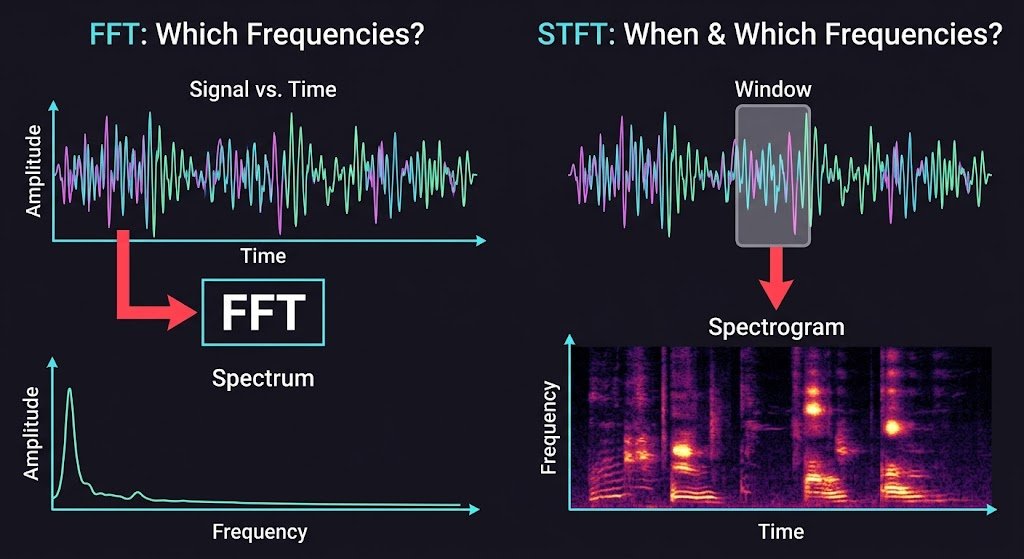
Table of Contents
- What Is STFT? Introduction to Short-Time Fourier Transform
- Why Does STFT Matter? Key Benefits
- STFT Key Facts, Types, and How It Works
- How to Use STFT in Python and MATLAB
- Common STFT Mistakes and Myths to Avoid
- Expert Tips for Best STFT Results
- Frequently Asked Questions About STFT
Have you ever wondered how your phone recognizes a song from just a few seconds of audio, or how a doctor reads a heartbeat trace? Most of these tools rely on one core technique: the STFT. If you are a student working through signal processing, you have probably met it in a lecture slide and wondered what it actually does. Standard Fourier analysis tells you which frequencies exist in a signal, but it throws away when they happen. The STFT fixes that gap by slicing a signal into small windows and analyzing each slice. In this guide, you will learn what STFT means, its formula, how it differs from FFT, and how to compute it in MATLAB and SciPy. You will also see common mistakes that trip up beginners.
What Is STFT? Introduction to Short-Time Fourier Transform
The Short-Time Fourier Transform (STFT) is a method for seeing how a signal’s frequency content changes over time. Think of a song. A regular Fourier transform tells you that the song contains bass, drums, and vocals, but not when each one plays. The STFT cuts the song into short overlapping pieces, usually a few milliseconds to a second long, and runs a Fourier transform on each piece. Stacking those results side by side gives you a picture of frequency versus time.
Here is a simple analogy. Imagine watching a movie through a small window that slides across the screen. At each moment you see only a short scene, but as the window moves, you piece together the whole story. The window function does the same job for your signal. It keeps a short chunk of data, then slides forward to the next chunk.
The output is usually displayed as a spectrogram, a heat map where brightness shows how strong each frequency is at each moment.
Why Does STFT Matter? Key Benefits
Understanding why STFT is so widely used will help you decide when to reach for it. Here are the main advantages:
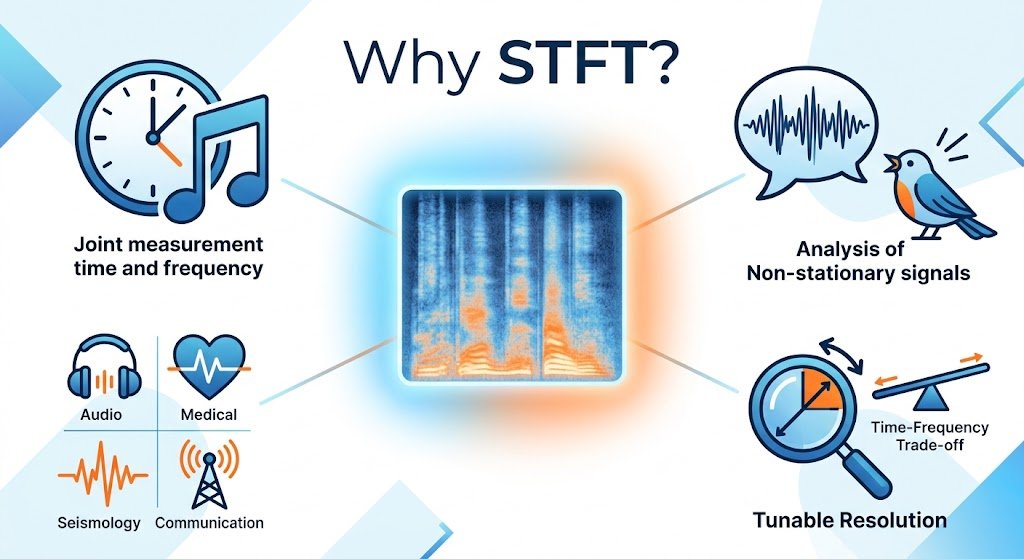
- Time and frequency together: You see when a sound or event occurs, not just which frequencies appear.
- Works on non-stationary signals: Speech, music, and radar returns change constantly, and STFT handles that change.
- Tunable resolution: Adjusting the window length lets you trade time detail for frequency detail.
- Fast computation: STFT uses the FFT internally, so it runs efficiently on long recordings.
- Visual interpretation: Spectrograms make patterns, such as a bird call or a machine fault, easy to spot.
- Wide applicability: Engineers use it in audio, medical imaging, seismology, and wireless communication.
A useful data point: according to a widely cited overview by Stanford’s EE264 course materials, short-time spectral analysis is the foundation of most practical audio processing systems. For a deeper reference, see the MathWorks documentation on STFT.
STFT — Key Facts, Types, and How It Works
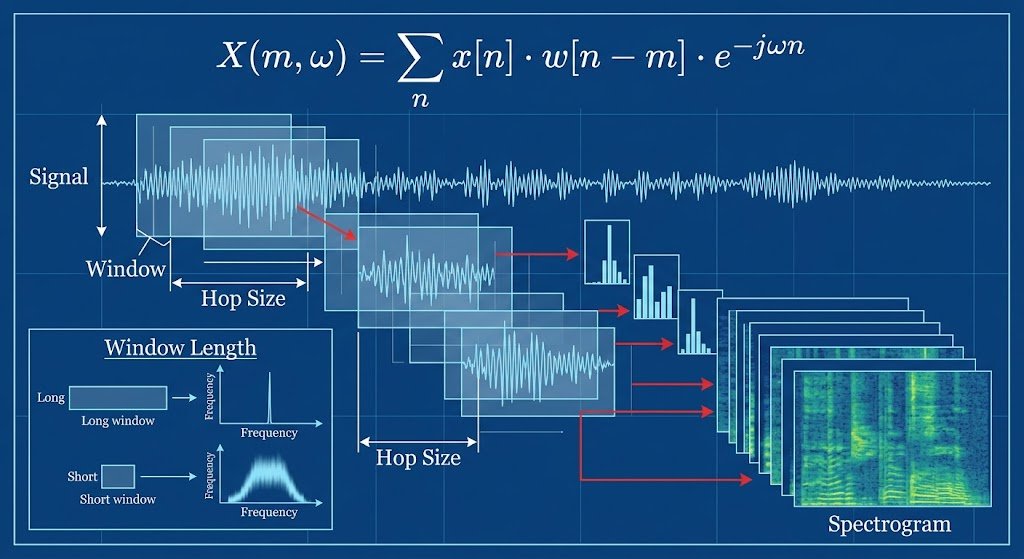
The STFT is defined mathematically as:
X(m, ω) = Σₙ x[n] · w[n − m] · e^(−jωn)
Here, x[n] is your signal, w[n] is the window, and m is the time position of the window. Each value of m gives you one frequency snapshot.
Window Length and Its Effect
The window length controls the trade-off. A long window gives sharp frequency resolution but blurs timing. A short window captures quick changes but produces fuzzy frequency lines. You cannot maximize both at once, which is known as the time-frequency uncertainty principle.
Overlap and Hop Size
The hop size is how far the window moves each step. When windows overlap, typically by 50% or 75%, your spectrogram looks smoother and you lose less information at window edges.
Window Types
Common windows include Hann, Hamming, and Blackman. Each shapes the edges differently, which affects leakage, the spreading of energy into neighboring frequencies.
Comparison of STFT and FFT
| Feature | FFT | STFT |
|---|---|---|
| Time information | Lost | Preserved |
| Frequency information | Yes | Yes |
| Best for | Stationary signals | Changing signals |
| Output | One spectrum | Matrix (time × frequency) |
| Typical use | Spectrum analysis | Spectrograms, speech, music |
How to Use STFT in Python and MATLAB
Following these steps will help you compute your first STFT and avoid the usual setup errors.
- Load or generate your signal. Make sure you know its sampling rate, because every frequency axis depends on it. A 1-second test tone sampled at 8 kHz is a good starting point.
- Choose a window and its length. Pick a Hann window of 256 samples for speech, or longer for music where pitch detail matters. Shorter windows suit fast transients like clicks.
- Set the overlap. Use 50% overlap as a safe default. This keeps your spectrogram smooth without wasting computation.
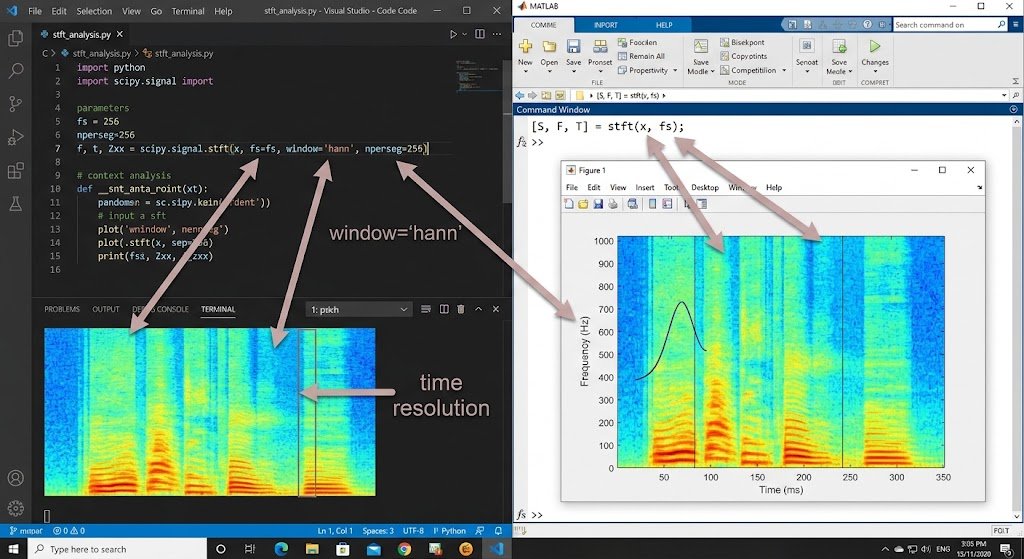
- Run the transform. In Python, call
scipy.signal.stft(x, fs=fs, window='hann', nperseg=256). In MATLAB, use[S, F, T] = stft(x, fs), which returns the complex matrix plus frequency and time axes. - Convert to magnitude and display. Take the absolute value of the result, often in decibels, then plot it with
pcolormeshin Python orimagescin MATLAB. - Check your axes. Confirm that frequencies run from 0 to fs/2 and that the time axis matches your signal length. Mismatched axes are the most common source of confusing plots.
Common STFT Mistakes and Myths to Avoid
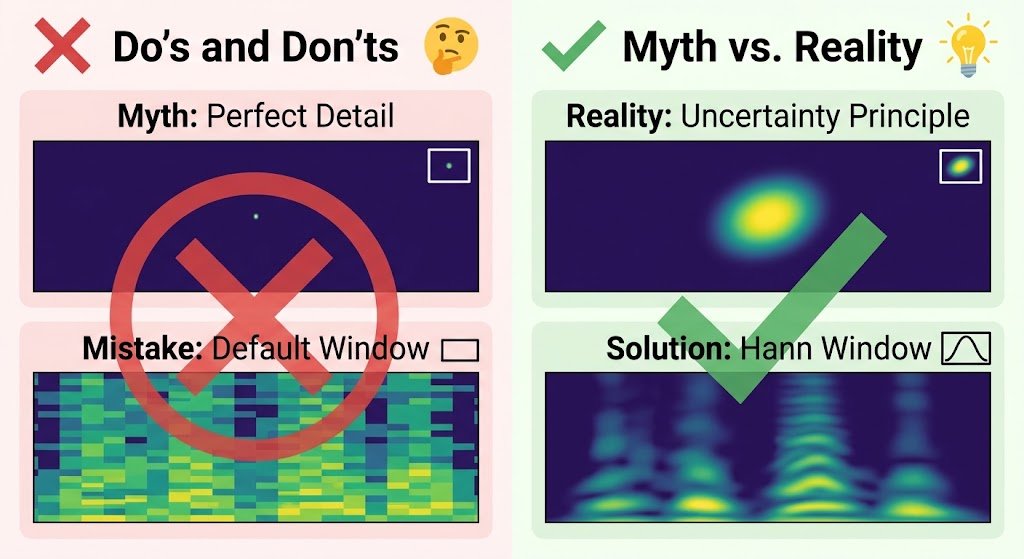
Mistake: Thinking STFT gives perfect time and frequency detail. The truth is that the uncertainty principle limits both. Choose a window length that matches the feature you want to see.
Mistake: Using the default window without considering leakage. Rectangular windows create strong side lobes that hide weak components. Use a Hann or Blackman window when signals vary greatly in amplitude.
Myth: Overlap is wasteful. The truth is that overlap improves smoothness and reduces edge artifacts. Without it, you may miss events that fall between windows.
Mistake: Forgetting the sampling rate when reading frequencies. The truth is that bin frequencies depend on fs. Always plot against the returned frequency vector instead of bin indices.
Myth: The spectrogram is the signal. The truth is that a spectrogram is an estimate shaped by your window choice. Different settings can produce visibly different pictures of the same recording.
Expert Tips for Best STFT Results
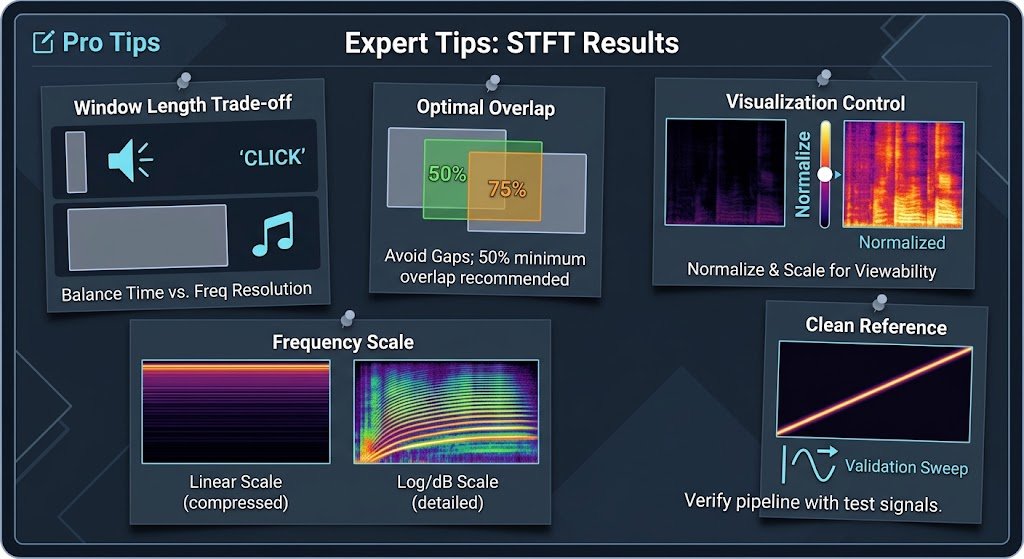
- Match window length to your signal’s timescale. Use short windows for clicks and long windows for sustained tones.
- Always use overlap. Start with 50% and increase to 75% if your plot looks patchy.
- Normalize before comparing. Scale your spectrograms consistently so that two recordings can be compared fairly.
- Use log scaling for display. Decibel plots reveal weak components that linear plots hide.
- Validate with a known signal. Test with a sine sweep first. If the spectrogram shows a clean diagonal line, your setup is correct.
Frequently Asked Questions About STFT
What is STFT used for?
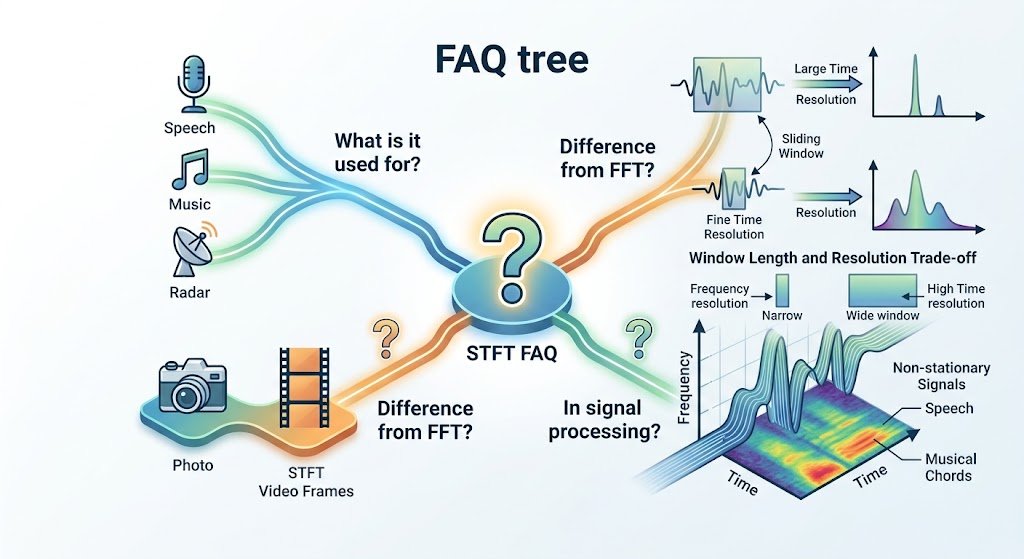
STFT is used whenever you need to see how frequencies change over time. Common applications include speech recognition, music analysis, audio equalization, and radar signal processing. It is also central to creating spectrograms, which help engineers spot faults in machinery or researchers study animal calls. Anywhere a signal’s character shifts, STFT gives you a clearer picture than a single Fourier transform. If your signal stays constant over its entire length, a plain FFT may be simpler and sufficient.
What is the difference between FFT and STFT?
The FFT analyzes an entire signal at once and tells you which frequencies exist, but not when they occur. The STFT applies Fourier analysis to short, overlapping segments, so it reveals how frequencies evolve. You can think of FFT as a photo of the whole signal and STFT as a series of frames in a video. STFT internally relies on FFT, which is why both share similar computational speed. Choose FFT for steady signals and STFT for anything that changes over time.
What is STFT in signal processing?
In signal processing, STFT is a technique that breaks a signal into windowed segments and computes the frequency content of each one. The result is a two-dimensional representation with time on one axis and frequency on the other. This makes it possible to study non-stationary signals such as speech, vibration, or biomedical recordings. It is the foundation for spectrograms and many modern audio features. Understanding window length and overlap is essential, because these settings directly control the balance between time and frequency detail.
Now you know the core ideas behind STFT, from its formula and window choices to practical code in SciPy and MATLAB. Remember three key points: STFT keeps time information that FFT discards, window length controls the time-frequency trade-off, and overlap keeps your spectrogram smooth. Start today by generating a simple sine sweep in Python and running scipy.signal.stft on it. Then change the window length and watch how the spectrogram shifts. Which signal are you planning to analyze first, speech, music, or sensor data? Share your project in the comments below!