 By DSP Staff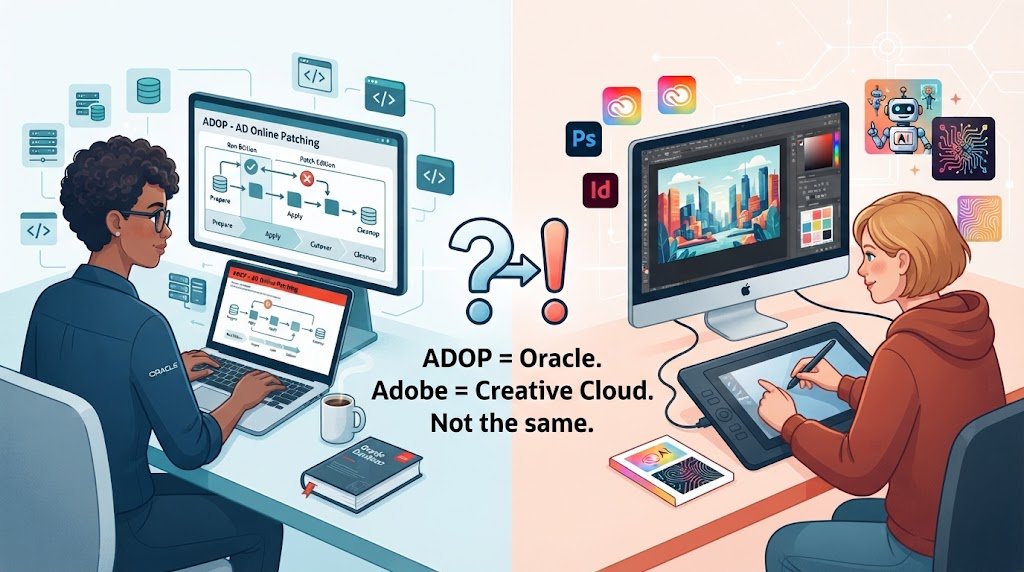
Table of Contents
- Introduction
- What Is ADOP?
- Why Does ADOP Matter? Key Benefits
- ADOP — Key Facts and How It Works
- How to Use ADOP Step by Step
- Common Mistakes and Myths to Avoid
- Expert Tips for Best Results
- Frequently Asked Questions
Introduction
Did you know that many people searching for “ADOP” are actually trying to figure out two very different things? Some are Oracle E-Business Suite administrators looking for a patching tool, while others are creative professionals asking about Adobe products. Confusing the two can waste hours of your time.
If you have typed “adop” into Google and felt lost, you are not alone. ADOP is the acronym for Online Patching (AD Online Patching) in Oracle E-Business Suite, and it also shows up in searches about Adobe software, Creative Cloud downloads, and Adobe IDs. This guide untangles both meanings so you know exactly which one applies to you.
In this guide, you will learn what ADOP stands for, what it does in Oracle environments, how to use it step by step, and how it differs from Adobe’s products. We will also cover common mistakes, expert tips, and answers to the questions people ask most. Whether you are a student, a new IT professional, or a curious general reader, you will walk away with clarity.
What Is ADOP?
Think of ADOP like renovating a busy restaurant while it stays open. The kitchen keeps serving customers while the crew upgrades the stove behind a curtain, then swaps everything over in minutes. Nobody waits in the cold.
ADOP stands for AD Online Patching. It is a utility in Oracle E-Business Suite (EBS) that lets administrators apply patches while users keep working. Instead of shutting down the entire system for hours, ADOP prepares a separate copy of the environment, applies changes there, and then switches users over with minimal downtime.
Outside Oracle, you may also see “ADOP” in searches related to Adobe. Adobe is a software company known for products like Photoshop, Acrobat, and Premiere Pro. Adobe does not use ADOP as an official product name, so those searches usually relate to Adobe tools or accounts instead.
Why Does ADOP Matter? Key Benefits
ADOP is valuable because it keeps business systems running while maintenance happens. Here are the main benefits you can expect:
- Less downtime: Users can keep working while patches are applied in the background.
- Safer patching: Changes happen on a separate edition, so you can roll back if something goes wrong.
- Faster maintenance cycles: Teams can apply patches more often without long outage windows.
- Better planning: Built-in phases like prepare, apply, finalize, and cutover give you clear checkpoints.
- Reduced risk: Testing on the patch edition helps catch problems before users see them.
- Easier cleanup: Old editions can be removed once everything is verified.
According to Oracle’s documentation, Online Patching is designed to minimize the downtime that traditional patching requires.
ADOP — Key Facts and How It Works
ADOP is built around a few core ideas. Understanding them makes the tool much easier to use. Here is a quick look.
Editions
ADOP works with two file system editions, often called the run edition and the patch edition. Users stay on the run edition while you apply changes to the patch edition. Once the patch is verified, you switch editions.
Phases
The process moves through phases: prepare, apply, finalize, cutover, and cleanup. Each phase has a specific job, and you should complete them in order.
Adobe-Related Products
When people search for Adobe topics, they usually want one of Adobe’s consumer or business tools. Here is how common Adobe products compare.
| Product | Main Use | Who Typically Uses It |
|---|---|---|
| Adobe Creative Cloud | Design, photo, video, and print tools | Designers, marketers, students |
| Adobe Firefly | AI-powered image and text generation | Creators exploring generative AI |
| Adobe Acrobat | Viewing, editing, and signing PDFs | Office workers, legal and admin teams |
Each product lives under a single Adobe account, which you create with your Adobe ID.
How to Use ADOP Step by Step
If you work with Oracle EBS, here is a simple overview of the ADOP workflow. Always follow your organization’s change process and Oracle’s official guide for your version.
- Check your environment. Confirm your EBS release supports Online Patching and that your file system has enough free space for the patch edition. Review your current patch edition status before you begin.
- Run the prepare phase. Use the ADOP command with the prepare option to set up the patch edition. This step copies the necessary files and prepares the database objects for the upcoming changes.
- Apply your patches. Run the apply phase to install patches onto the patch edition. Monitor the log files closely, because errors here are easier to fix before cutover.
- Finalize and cut over. Run the finalize phase, then the cutover phase to switch users to the newly patched edition. Keep an eye on the application during this switch.
- Clean up. Once you have verified everything works, run the cleanup phase to remove the old edition and free space. Only do this after you are confident in the new setup.
Common Mistakes and Myths to Avoid
Mistake: Skipping the pre-checks. Jumping straight into patching often leads to avoidable errors. The truth is that you should review prerequisites and patch readme files before starting.
Myth: ADOP means zero downtime. Many people assume the process never affects users. The truth is that cutover causes a brief pause, so you should plan it carefully.
Mistake: Ignoring the log files. Some administrators only check for a final success message. The truth is that logs reveal warnings that can become serious problems later.
Myth: ADOP is the same as Adobe Creative Cloud. The names look similar, which causes confusion. The truth is that ADOP is an Oracle tool, while Creative Cloud is a separate Adobe subscription.
Mistake: Running cleanup too early. Removing the old edition before testing can leave you with no easy rollback. The truth is that you should wait until users and reports confirm everything works.
Expert Tips for Best Results
- Test patches in a non-production environment first to catch issues early.
- Schedule cutover during low-traffic hours to limit the impact on users.
- Back up your environment before starting any patching cycle.
- Document each phase so your team can trace what changed and when.
- Keep your Adobe ID details safe if you use Adobe products alongside your work tools.
Frequently Asked Questions
What does ADOP stand for?
ADOP stands for AD Online Patching in Oracle E-Business Suite. It is a utility that applies patches while users keep working, reducing downtime during maintenance. The tool uses separate editions of the file system so changes can be tested before users switch over. Adobe does not use ADOP as an official product name, so searches with this term usually point to Oracle’s patching tool.
What is Adobe Firefly used for?
Adobe Firefly is a family of generative AI tools that create images, text effects, and other creative content from written prompts. Designers and marketers use it to brainstorm visuals, edit images, and speed up early concepts. It is built into several Adobe applications and is also available through a web interface. Firefly works best as a starting point that you refine with your own creative judgment.
How do I create an Adobe ID?
To create an Adobe ID, go to the Adobe account sign-up page and enter your email address, then choose a password. Follow the verification steps Adobe sends to your inbox, and complete your profile details. Your Adobe ID gives you access to Creative Cloud, Acrobat, and other Adobe services. Keep your password secure and enable two-step verification for extra protection.
Conclusion
ADOP most often means AD Online Patching in Oracle E-Business Suite, and it helps you maintain systems with less downtime. Remember these three key points: ADOP stands for AD Online Patching, it works in phases to protect your users, and Adobe searches are a separate topic that uses different tools and accounts. Keeping these straight saves time and confusion.
Start today by checking whether your Oracle EBS environment is ready for Online Patching, or by creating an Adobe ID if you want to explore Creative Cloud. Try this now with one small step. Which meaning of ADOP brought you here: the Oracle patching tool or the Adobe products?