 By DSP Staff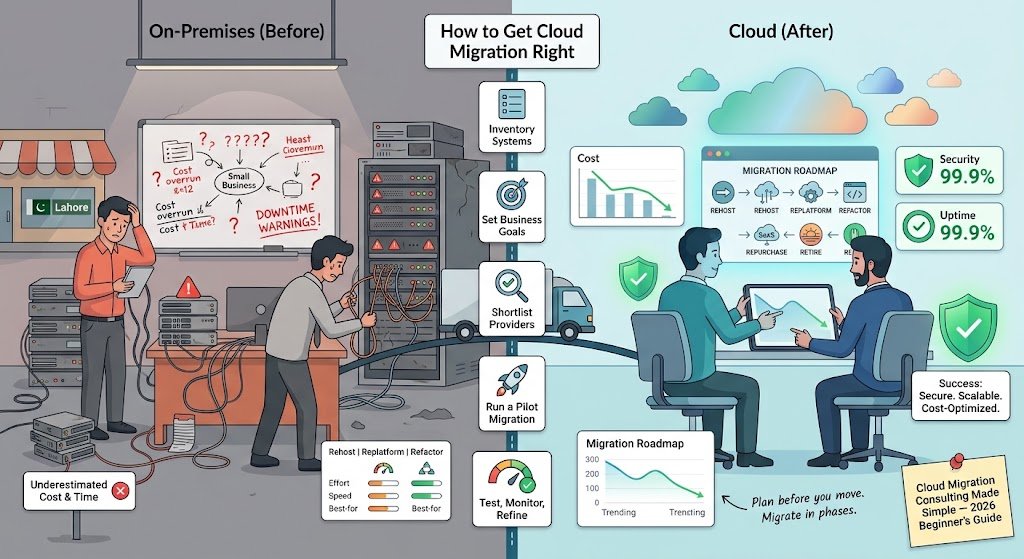
Introduction
Did you know that most companies underestimate the cost and time of moving to the cloud by a wide margin? Many businesses start a cloud migration with confidence, only to find their servers, data, and apps tangled in ways nobody expected. That is where cloud migration consulting comes in.
If you have ever wondered whether you need help moving your systems online, you are in the right place. Cloud migration consulting is the professional guidance that helps you plan, move, and manage your technology in the cloud without losing data or money.
In this guide, you will learn what cloud migration consulting actually means, why it matters, the main types of services available, and a step-by-step way to get started. We will also cover common mistakes, expert tips, and answers to the questions people search for most. Whether you run a small shop in Lahore or manage IT for a growing company in Karachi, this guide will help you make a smarter decision.
Table of Contents
- Introduction
- What Is Cloud Migration Consulting?
- Why Does Cloud Migration Consulting Matter?
- Cloud Migration Consulting: Key Facts and Types
- How to Get Cloud Migration Consulting Right
- Common Mistakes and Myths to Avoid
- Expert Tips for Best Results
- Frequently Asked Questions
What Is Cloud Migation Consulting?
Think of moving house. You could pack everything yourself, toss boxes into a truck, and hope the couch fits through the door. Or you could hire a moving company that measures the rooms, plans the route, and handles the fragile stuff. Cloud migration consulting is the moving company for your technology.
Cloud migration consulting means working with experts who help you move your data, applications, and IT systems from on-premises servers (the computers sitting in your office or data room) to a cloud platform like Amazon Web Services (AWS), Microsoft Azure, or Google Cloud. The consultant studies your current setup, decides what should move and how, and then guides the actual transfer. They also help you run everything safely afterward.
A good consultant does not just move files. They ask questions about your business goals, check for security risks, and make sure your team knows how to use the new system.
Why Does Cloud Migration Consulting Matter?
Moving to the cloud is powerful, but doing it poorly can be expensive. Here is why expert help pays off:
- Lower risk of downtime: Consultants plan the move so your business keeps running. Gartner has noted that unplanned IT downtime can cost businesses thousands of dollars per minute, which is why careful planning matters.
- Better cost control: Experts help you size resources correctly so you do not pay for servers you never use.
- Stronger security: Consultants check permissions, encryption, and compliance rules before anything goes live.
- Faster results: Someone who has done dozens of migrations can avoid the mistakes a first-timer makes.
- Room to grow: A well-designed cloud setup lets you add customers, staff, or features without buying new hardware.
- Less stress for your team: Your staff can keep focusing on their real jobs while specialists handle the technical move.
Cloud Migration Consulting: Key Facts and Types
Not every migration looks the same. Consultants usually work through a few common approaches, often called the “6 Rs.” Here are the most useful ones to know.
Rehost (Lift and Shift)
Rehosting means moving your applications to the cloud exactly as they are, without big changes. It is the fastest option and a good starting point for simple systems.
Replatform (Lift, Tinker, and Shift)
Replatforming makes small upgrades during the move, such as switching to a managed database. You get some cloud benefits without rebuilding everything.
Refactor (Re-architect)
Refactoring rebuilds an application to take full advantage of cloud features. It takes more time but can deliver the biggest long-term gains.
Comparison Table
| Approach | Effort Level | Speed | Best For |
|---|---|---|---|
| Rehost | Low | Fast | Quick wins, legacy apps |
| Replatform | Medium | Moderate | Apps needing small upgrades |
| Refactor | High | Slow | Long-term growth and scale |
Many consultants also suggest a mix of these approaches, depending on each system’s needs.
How to Get Cloud Migration Consulting Right
Ready to plan your move? Follow these steps to keep things on track.
- Inventory your current systems. List every server, application, and database you use. Include who depends on each one, because you cannot move what you have not counted.
- Set clear business goals. Decide whether you want to cut costs, improve speed, or support remote teams. Your goals will shape every decision your consultant makes.
- Shortlist providers. Look for firms with proven migration experience in your industry. Ask for case studies, and check reviews from past clients.
- Run a pilot migration. Move one small, low-risk application first. This shows you how the process works and reveals problems before they become expensive.
- Test, monitor, and refine. After each move, check performance, security, and costs. Adjust your plan based on what you learn, then continue with the rest of your systems.
Common Mistakes and Myths to Avoid
Mistake: Moving everything at once. Trying to migrate your entire business in a single weekend often leads to outages. The truth is that phased migrations are safer and easier to fix.
Myth: The cloud is always cheaper. Cloud services can save money, but poorly configured resources can become costly fast. The truth is that cost savings come from careful sizing and regular reviews.
Mistake: Skipping security planning. Some teams assume the cloud provider handles all security. The truth is that you share responsibility, and your consultant should clarify exactly which parts are yours.
Myth: You only need consultants for huge companies. Small businesses benefit too, especially when they have limited in-house IT staff. The truth is that a focused, smaller engagement can still prevent expensive surprises.
Mistake: Ignoring staff training. A new system is only useful if your team knows how to run it. The truth is that training should be part of every migration plan.
Expert Tips for Best Results
- Ask for a written migration plan with timelines, costs, and risks listed clearly before you sign anything.
- Confirm who owns your data and how you can export it if you ever switch providers.
- Set up cost alerts from day one so you spot unexpected spending early.
- Document everything so your team can understand and maintain the setup after the consultant leaves.
- Schedule regular reviews every quarter to make sure your cloud setup still fits your business.
Frequently Asked Questions
What does a cloud consultant do?
A cloud consultant assesses your current IT systems, recommends which applications to move and how, and manages the migration itself. They also help with security, cost optimization, and staff training. Many consultants stay on after the move to monitor performance and suggest improvements. Think of them as a guide who plans the route, carries the heavy load, and makes sure you arrive safely at your destination.
How much does a cloud migration cost?
The cost depends on the size of your systems, the complexity of your applications, and the approach you choose. A small business with a few applications may spend a modest amount, while large enterprises can invest far more. Ask providers for a detailed quote that breaks down assessment, migration, and ongoing support fees. Comparing several quotes helps you spot hidden costs.
What are the top cloud migration tools?
Popular tools include AWS Migration Hub, Azure Migrate, and Google Cloud Migrate. Many consultants also use third-party tools for discovery, data transfer, and monitoring. The best choice depends on your target cloud platform and your existing systems. Your consultant should recommend the tools that match your goals rather than pushing a single product.
Conclusion
Cloud migration consulting helps you move your systems to the cloud safely, affordably, and with far less stress. Remember these three key points: plan before you move, migrate in phases, and keep security and cost reviews running after the move. Each one protects your business from the most common and expensive problems.
Start today by listing your current systems and writing down your top three business goals. Then reach out to a few providers and compare their approaches. Which part of your current setup worries you most right now?