 By DSP Staff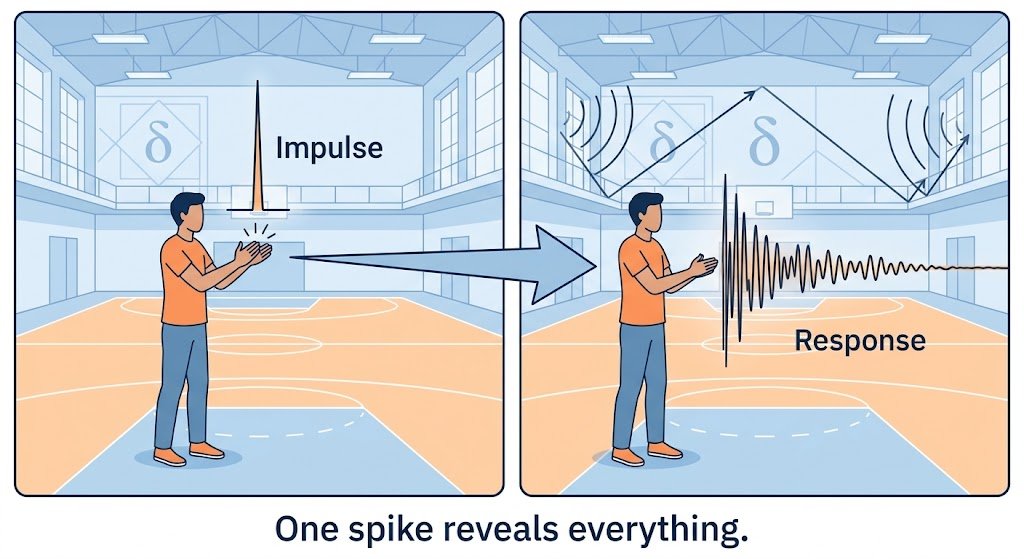
Table of Contents
- What Is Impulse Response? Introduction to the Concept
- Why Does Impulse Response Matter? Key Benefits
- Impulse Response Key Facts, Types, and How It Works
- How to Measure an Impulse Response Step by Step
- Common Impulse Response Mistakes and Myths
- Expert Tips for Best Impulse Response Results
- Frequently Asked Questions About Impulse Response
What if one tiny, instant spike could reveal everything about how a system behaves? That is the core idea behind the impulse response, and it shows up in places you might not expect. Engineers use it to test radar and audio equipment, musicians use it to recreate the sound of famous concert halls, and economists use it to model how shocks ripple through a economy. If you are studying signals and systems, you will meet this concept early and use it often. In this guide, you will learn what an impulse response is, the impulse response formula, how it works in practice, and how to measure one yourself. You will also see the mistakes that trip up beginners.
What Is Impulse Response? Introduction to the Concept
The impulse response of a system is its output when you give it a very short input, called an impulse. Think of clapping your hands in an empty gymnasium. The sharp clap is the impulse, and the echoes that bounce back and fade over the next second are the response. Those echoes tell you a lot about the room’s size, shape, and materials.
In mathematics, the impulse is modeled as the Dirac delta function for continuous-time systems, or the unit sample function for discrete-time systems. You can picture it as a spike that is infinitely tall and infinitely thin, with a total area of one. Real hardware cannot produce a perfect spike, but a very short pulse gets you close enough for most work.
Here is the key idea: for any linear time-invariant (LTI) system, the impulse response completely describes its behavior. If you know that one response, you can predict the output for any input.
Why Does Impulse Response Matter? Key Benefits
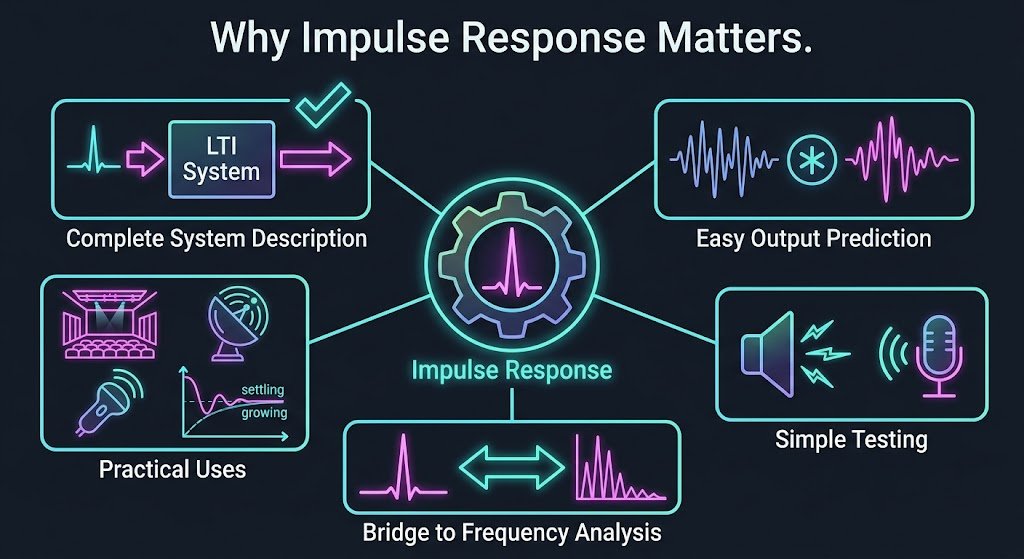
Knowing why this idea matters will help you see where it fits in your coursework and your career. Here are the main advantages:
- Complete system description: For LTI systems, one impulse response predicts the output for any input signal.
- Easy output prediction: You can compute the output with convolution instead of solving the system from scratch each time.
- Simple testing: You can probe a physical system with a short pulse and record how it reacts.
- Bridge to frequency analysis: Taking the Fourier transform of the impulse response gives you the frequency response, linking time and frequency views.
- Practical audio and imaging uses: Reverb effects, room correction, radar, and ultrasound all depend on it.
- Stability checks: The shape of the response shows whether a system settles down or keeps growing.
A useful reference point comes from the history of audio testing. According to the Wikipedia article on impulse response, impulse response loudspeaker testing was first developed in the 1970s, and engineers still use it to spot timing errors in speaker designs.
Impulse Response Key Facts, Types, and How It Works
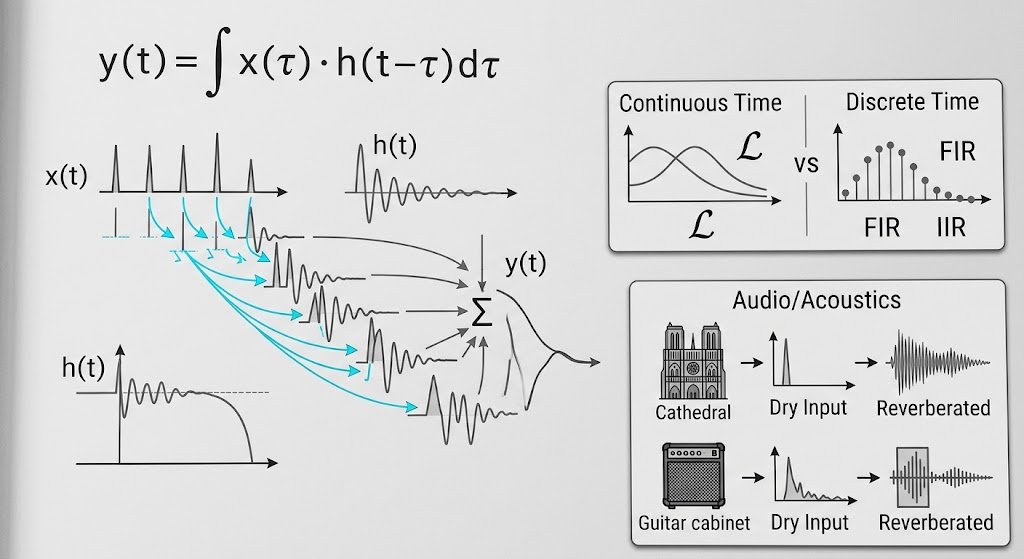
The output of an LTI system is found by convolving the input with the impulse response. In continuous time, the impulse response formula is:
y(t) = ∫ x(τ) · h(t − τ) dτ
Here, x(t) is the input, h(t) is the impulse response, and y(t) is the output. In discrete time, the integral becomes a sum: y[n] = Σ x[k] · h[n − k].
Impulse Response in Continuous Time
In continuous-time systems, the impulse response is often found from a differential equation or from a transfer function. Taking the inverse Laplace transform of the transfer function gives you h(t) directly. This route is common in control systems and circuit analysis.
Impulse Response in Discrete Time
Discrete systems, such as digital filters, store the impulse response as a finite list of numbers. A FIR filter has a response that ends after a fixed number of samples, while an IIR filter can keep ringing indefinitely. Your choice between them affects both stability and computing cost.
Impulse Response in Audio and Acoustics
In audio, an impulse response captures the acoustic fingerprint of a space or device. Software convolves your dry recording with that response to create the sound of a cathedral or a guitar cabinet. The same principle explains impulse response guitar effects, where a recorded cabinet response stands in for a physical amplifier.
Comparison of Impulse and Frequency Response
| Feature | Impulse Response | Frequency Response |
|---|---|---|
| Domain | Time | Frequency |
| Input used | Short spike (impulse) | Sinusoids at many frequencies |
| Obtained by | Measuring output to a pulse | Fourier transform of impulse response |
| Reveals | Timing, decay, echoes | Gain and phase at each frequency |
| Typical use | Reverb, system identification | Filter design, equalization |
How to Measure an Impulse Response Step by Step
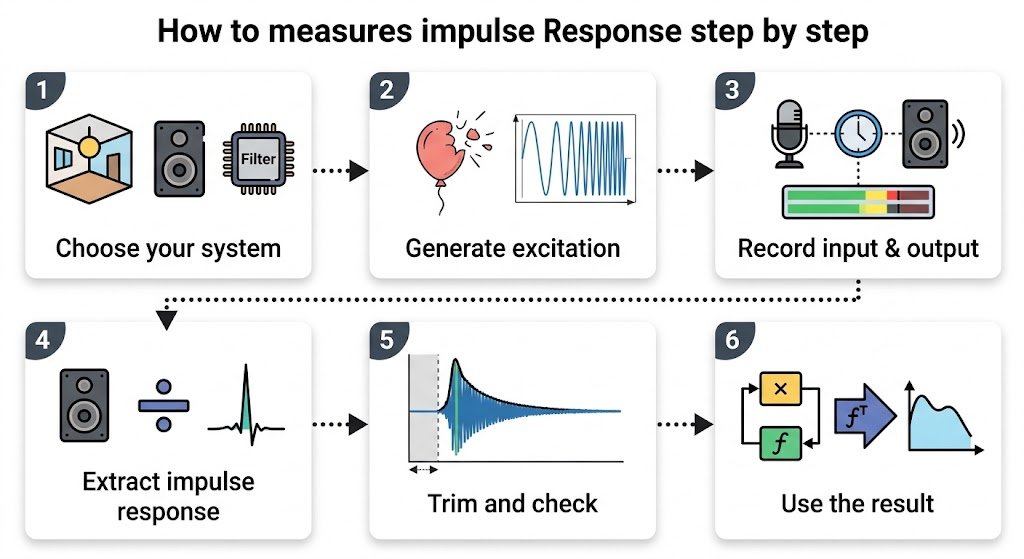
Following these steps will help you run your first impulse response test and avoid common setup errors.
- Choose your system. Pick something simple, such as a room, a speaker, or a digital filter you have written. Clear boundaries make your results easier to interpret.
- Generate or prepare the excitation. For a hands-on test, use a short click or a balloon pop. For more accurate results, use a sine sweep or a maximum length sequence, which gives you a cleaner measurement.
- Record the input and output together. Use a recording setup that captures both signals at the same sampling rate. Keep the recording level below clipping so the system stays in its linear range.
- Extract the impulse response. For a sweep, deconvolve the recorded output with the known input. For a direct pulse, the recorded output is already close to the impulse response.
- Trim and check the result. Remove silence before the response starts, then look for a clear peak followed by decay. A response that grows over time signals instability or a recording problem.
- Use the result. Convolve it with new input signals to predict the output, or take its Fourier transform to see the frequency response.
Common Impulse Response Mistakes and Myths to Avoid
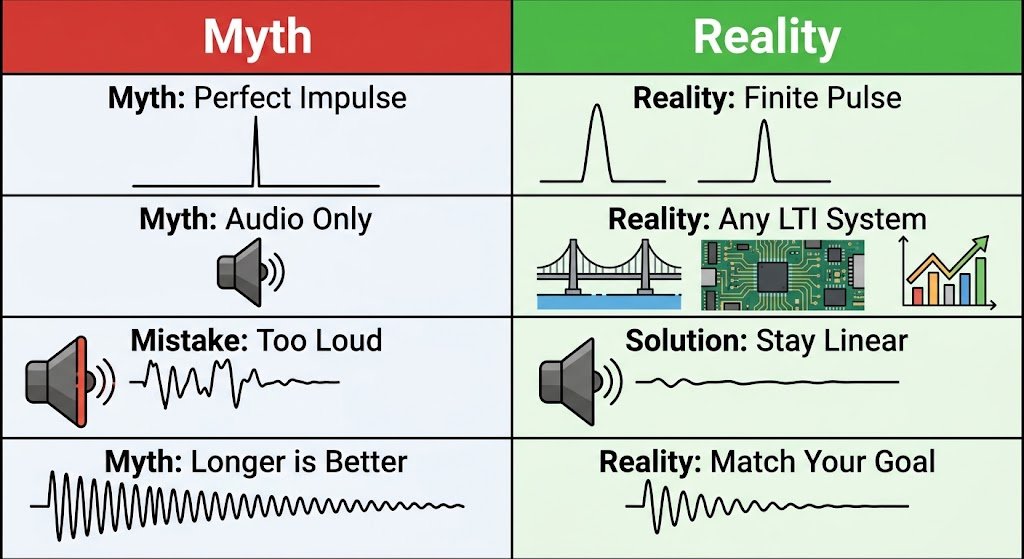
Mistake: Believing a real pulse equals a perfect impulse. The truth is that real pulses have finite width and energy. Keep the pulse short enough for your system’s timescale, and check that the result looks consistent when you repeat the test.
Myth: Impulse response only works for audio. The truth is that the concept applies to any LTI system, including mechanical structures, electrical circuits, and economic models. The math is the same across all these fields.
Mistake: Driving a nonlinear system too hard. The truth is that impulse response assumes linearity. A pulse that is too loud can push a loudspeaker or amplifier into distortion, which corrupts the measurement. Lower the level and repeat the test.
Myth: A longer response always means a better system. The truth is that a long tail can mean excessive reverb or poor damping, depending on your goal. Judge the response by how well it matches the behavior you need.
Mistake: Forgetting that convolution order matters for timing. The truth is that a delay in your recording setup shifts the whole response. Align your input and output carefully before you interpret the peak position.
Expert Tips for Best Impulse Response Results
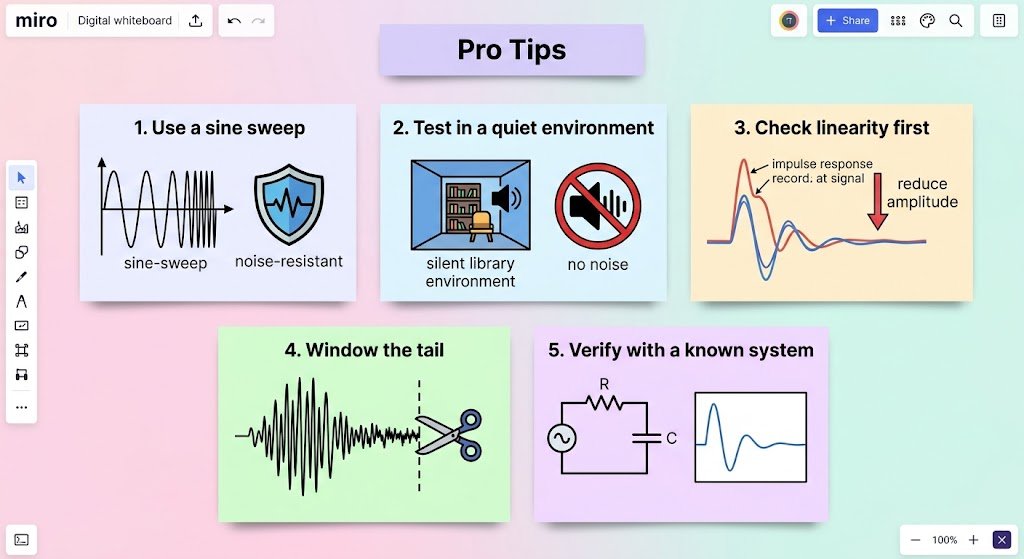
- Use a sine sweep for cleaner data. Sweeps resist noise better than a single click, so your measurement will be more reliable.
- Test in a quiet environment. Background noise adds unwanted tails to your impulse response.
- Check linearity first. Measure at two different levels; if the shapes differ, reduce your input amplitude.
- Window the tail. Cutting the response once it fades into noise keeps your convolution results accurate and efficient.
- Verify with a known system. Test on a simple filter with a known impulse response before measuring real hardware.
Frequently Asked Questions About Impulse Response
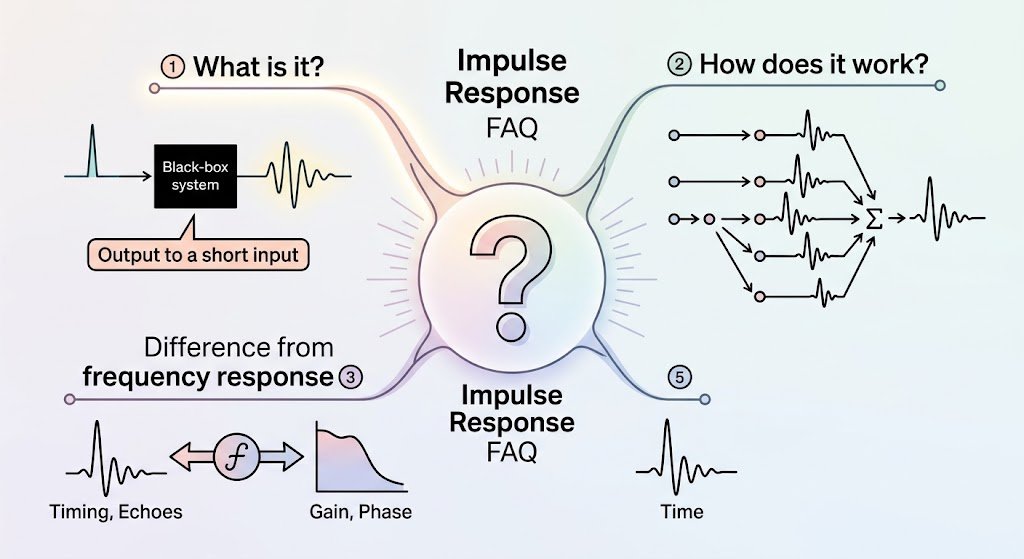
What is meant by impulse response?
Impulse response means the output a system produces when you give it a very short input, called an impulse. It shows how the system reacts over time, including how quickly it responds and how long its effects last. For linear time-invariant systems, this single response is enough to predict the output for any input. Engineers use it to describe filters, circuits, speakers, and rooms. If you know a system’s impulse response, you know its full behavior in the time domain.
How do impulse responses work?
An impulse response works by combining with the input through convolution. Each point in the input triggers a scaled and shifted copy of the impulse response, and all these copies add together to form the output. This is why a sharp clap in a hall produces a long tail of echoes. Because convolution is computationally heavy, many systems use the Fourier transform to switch to the frequency domain, multiply, and transform back. This shortcut makes real-time audio effects practical.
What is the difference between frequency response and impulse response?
The impulse response describes a system’s behavior over time, while the frequency response describes how it treats each frequency. They are two views of the same system and connect through the Fourier transform. The frequency response shows gain and phase at each frequency, which helps with equalization and filter design. The impulse response reveals timing, echoes, and decay. Use the impulse response when timing matters, and the frequency response when you care about which tones get boosted or cut.
You now have the essentials: an impulse response is a system’s reaction to a single short spike, the convolution formula turns that reaction into the output for any input, and measuring one is more practical than it sounds. Remember these three points: LTI systems are fully described by their impulse response, convolution predicts output, and the Fourier transform links time and frequency views. Start today by clapping in a room and listening to the echoes, then notice how the sound changes when you move. Which system would you like to measure first, a room, a speaker, or a digital filter? Share your project in the comments below!